
Unlock Powerful Marketing Insights with Google Analytics GA4: A Blueprint for Growth
1. Why Google Analytics 4 Matters for Smart Digital Marketers
Google Analytics 4 goes beyond counting website visitors — it reveals how people interact with your site, turning insights into strategies that drive conversions and strengthen your brand.
2. Setup for Success: Google Analytics 4 Essentials
- Understand the Google Analytics 4 event-based model: Google Analytics 4 replaces Universal Analytics with event-based tracking. Mapping key user interactions—like form fills, video plays and scroll depth—gives you meaningful insights into customer journeys.
- Use Google Tag Manager to deploy custom events and cross-domain tracking efficiently.
- Harness machine learning-driven predictive metrics and audience insights to anticipate buying behavior or customer churn, enabling precision-targeted campaigns
3. The Reports That Drive ROI
- Acquisition Reports: See which channels—organic search, email, social—are delivering the most engaged traffic and conversions.
- Benchmarking Reports: Compare your performance against industry averages for traffic, bounce rates, and session duration. Identify which channels need more investment.
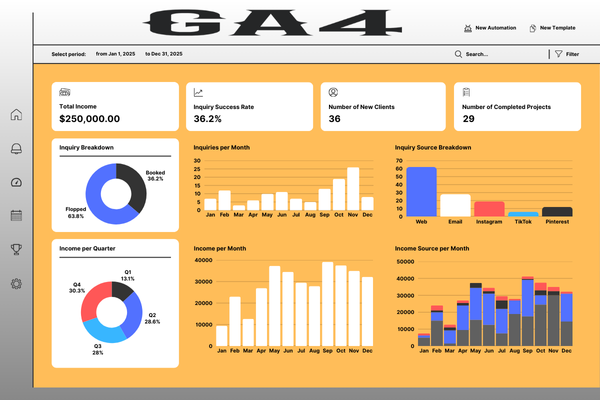
- Custom Dashboards: Build dashboards focused on the Page Value metric, identifying which blog posts or pages contribute most to conversions.
4. Optimize Content with Google Analytics 4
- Use Advanced Segments to isolate high-impact content or low-hanging fruit:
- Pages with high traffic but also high bounce rate may need UX improvements.
- Pages with low traffic but high engagement are ripe for better promotion.
- Identify keywords and queries performing just off-page‑1 in Search Console → Analytics. Optimize using Google Analytics 4 those pages to push them to page one for quick SEO wins.
5. Personalize with Predictive and Behavioral Data using Google Analytics 4
- Segment audiences by behavior (e.g., repeat visitors who read three posts)—then trigger content recommendations or email flows tailored to those groups.
- Use predictive data like purchase probability in GA4 to feed smarter remarketing campaigns or email offers.
6. How Google Analytics 4 integrate and Automate Your Marketing Stack
- Feed Google Analytics 4 data into your marketing automation platform (e.g., HubSpot, Marketo, ActiveCampaign). Automate personalized follow-ups or content delivery based on visitor behavior and engagement patterns.
- Implement behavioral trigger campaigns: for example, visitors who spend time on case studies receive a tailored email nurturing campaign.
7. Ensure Privacy Compliance & Data Accuracy
- Use Consent Mode v2 and also monitor compliance settings which need to maintain accurate data and comply with GDPR/CCPA regulations.
- Reconcile discrepancies between Google Analytics 4 and Google Ads using GA4’s Conversion Differences report for consistent attribution.
8. Beyond Analytics( Google Analytics 4 ): Adapting to an AI-Driven Era
With AI tools like Google’s AI Overviews and ChatGPT increasingly replacing traditional search, data visibility and content optimization must evolve. Focus on building brand authority across platforms and optimizing for Generative Engine Optimization (GEO) — a newer approach to gain visibility in AI-generated answers.
✅ Ready to Take Action? Your Google Analytics 4 Strategy in 3 Steps
| Step | Action | Why It Matters |
|---|---|---|
| 1 | Audit GA4 setup: events, conversions, audiences, compliance | Ensures accurate tracking & meaningful predictive data |
| 2 | Build key dashboards: Acquisition, Engagement, Page Value, Benchmarking | Focuses You on high-impact, actionable metrics |
| 3 | Segment & automate: behavioral audiences, predictive triggers, A/B tested content recommendations | Personalization at scale drives better engagement & conversions |
Final Thoughts
Google Analytics is no longer just a reporting tool—it’s the heartbeat of modern digital marketing. With smart GA4 setup, insightful dashboards, predictive audience targeting, and automated content workflows, you’re positioned to turn data into decisions that scale your brand.
Let me know if you’d like a downloadable checklist or template for GA4 dashboards, or need help crafting content tailored specifically to the predictive analytics features.
. Setup for Success: GA4 Essentials
- Understand the GA4 event-based model: GA4 replaces Universal Analytics with event-based tracking. Mapping key user interactions—like video plays, form fills, and scroll depth—gives you meaningful insights into customer journeys
- Use Google Tag Manager to deploy custom events and cross-domain tracking efficiently .
- Leverage predictive metrics and audiences, powered by machine learning, to forecast purchase intent or churn and trigger targeted campaigns .
3. The Reports That Drive ROI
- Acquisition Reports: See which channels—organic search, email, social—are delivering the most engaged traffic and conversions.
- Benchmarking Reports: Compare your performance against industry averages for traffic, bounce rates, and session duration. Identify which channels need more investment .
- Custom Dashboards: Build dashboards focused on the Page Value metric, identifying which blog posts or pages contribute most to conversions.
4. Optimize Content with Analytics
- Use Advanced Segments to isolate high-impact content or low-hanging fruit:
- Pages with high traffic but also high bounce rate may need UX improvements.
- Pages with low traffic but high engagement are ripe for better promotion
- Identify keywords and queries performing just off-page‑1 in Search Console → Analytics. Optimize those pages to push them to page one for quick SEO wins
5. Personalize with Predictive and Behavioral Data
- Segment audiences by behavior (e.g., repeat visitors who read three posts)—then trigger content recommendations or email flows tailored to those groups .
- Use predictive data like purchase probability in GA4 to feed smarter remarketing campaigns or email offers.
6. Integrate and Automate Your Marketing Stack
- Feed GA data into your marketing automation platform (e.g., HubSpot, Marketo, ActiveCampaign). Automate personalized follow-ups or content delivery based on visitor behavior and engagement patterns.
- Implement behavioral trigger campaigns: for example, visitors who spend time on case studies receive a tailored email nurturing campaign.
7. Ensure Privacy Compliance & Data Accuracy
- Use Consent Mode v2 and monitor compliance settings to maintain accurate data and comply with GDPR/CCPA regulations.
- Reconcile discrepancies between GA4 and Google Ads using GA4’s Conversion Differences report for consistent attribution.
8. Beyond Analytics: Adapting to an AI-Driven Era
With AI tools like Google’s AI Overviews and ChatGPT increasingly replacing traditional search, data visibility and content optimization must evolve. Focus on building brand authority across platforms and optimizing for Generative Engine Optimization (GEO) — a newer approach to gain visibility in AI-generated answers.
✅ Ready to Take Action? Your GA Strategy in 3 Steps
| Step | Action | Why It Matters |
| 1 | Audit GA4 setup: events, conversions, audiences, compliance | Ensures accurate tracking & meaningful predictive data |
| 2 | Build key dashboards: Acquisition, Engagement, Page Value, Benchmarking | Focuses You on high-impact, actionable metrics |
| 3 | Segment & automate: behavioral audiences, predictive triggers, A/B tested content recommendations | Personalization at scale drives better engagement & conversions |
Final Thoughts
Google Analytics is no longer just a reporting tool—it’s the heartbeat of modern digital marketing. With smart GA4 setup, insightful dashboards, predictive audience targeting, and automated content workflows, you’re positioned to turn data into decisions that scale your brand.